Restaurant inventory app
Inventory counts in minutes. Know exactly what to order.
Staff count on any phone or tablet in the cases, bags, and bottles you buy. RecipeMate turns that count into a reorder list for each supplier, tracks what you use each week, and works out your cost of goods every month.
Inventory for coffee shops and restaurants
From the shelf to the supplier, without a spreadsheet.
Counts, par levels, reorder lists, count history, and cost of goods reports in the same app as your recipe costing and shift checklists.
Staff counts
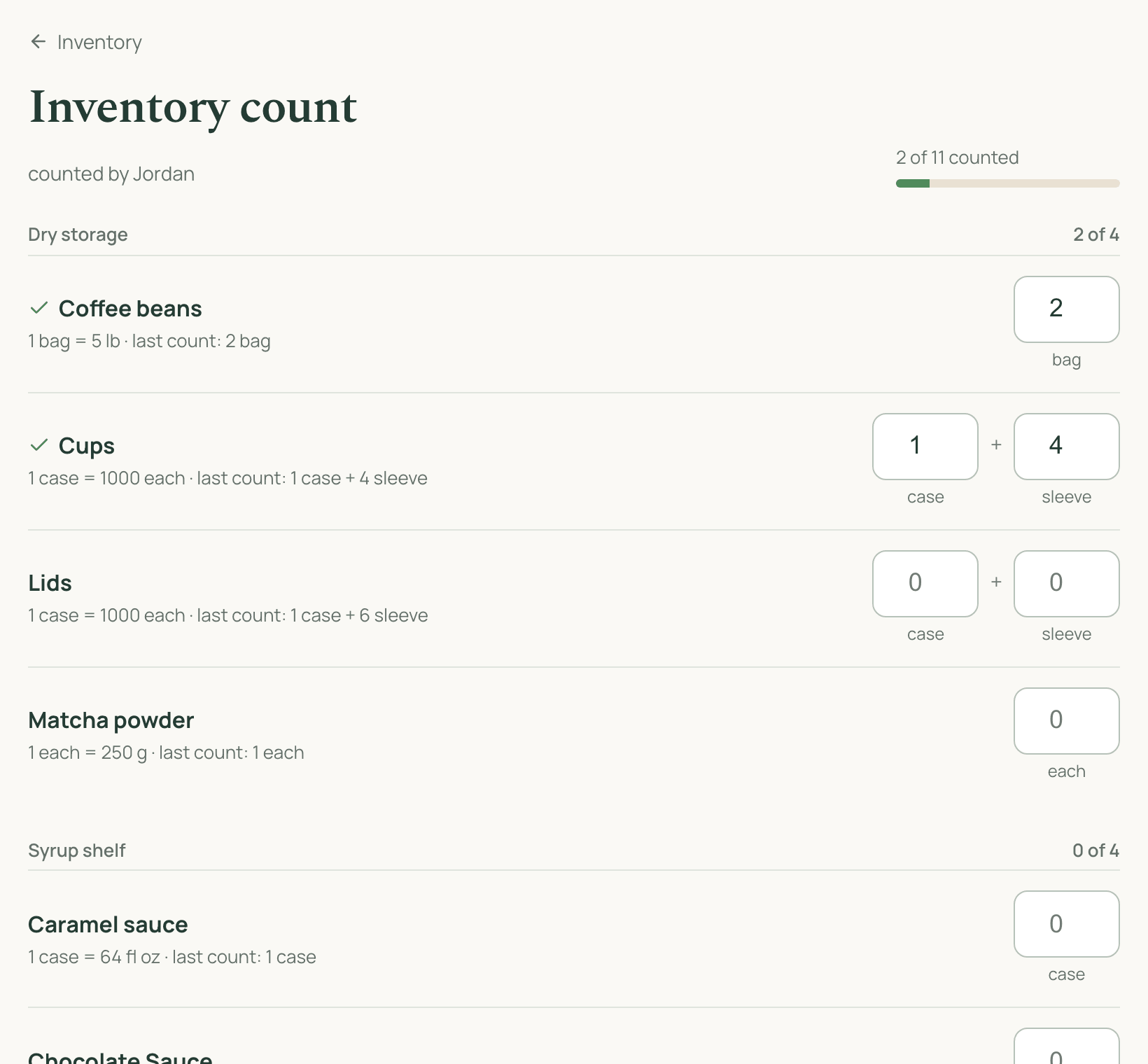
Count in the cases, bags, and bottles you buy
The count sheet is grouped by storage area (walk-in, dry storage, syrup shelf) so staff count in the order they walk the shop. Each item shows its pack size and last week's count, so a typo stands out. Open packs count too: 1 case + 4 sleeves. Skipped items keep their last count, and an unfinished count is saved on the device.
Par levels and reordering
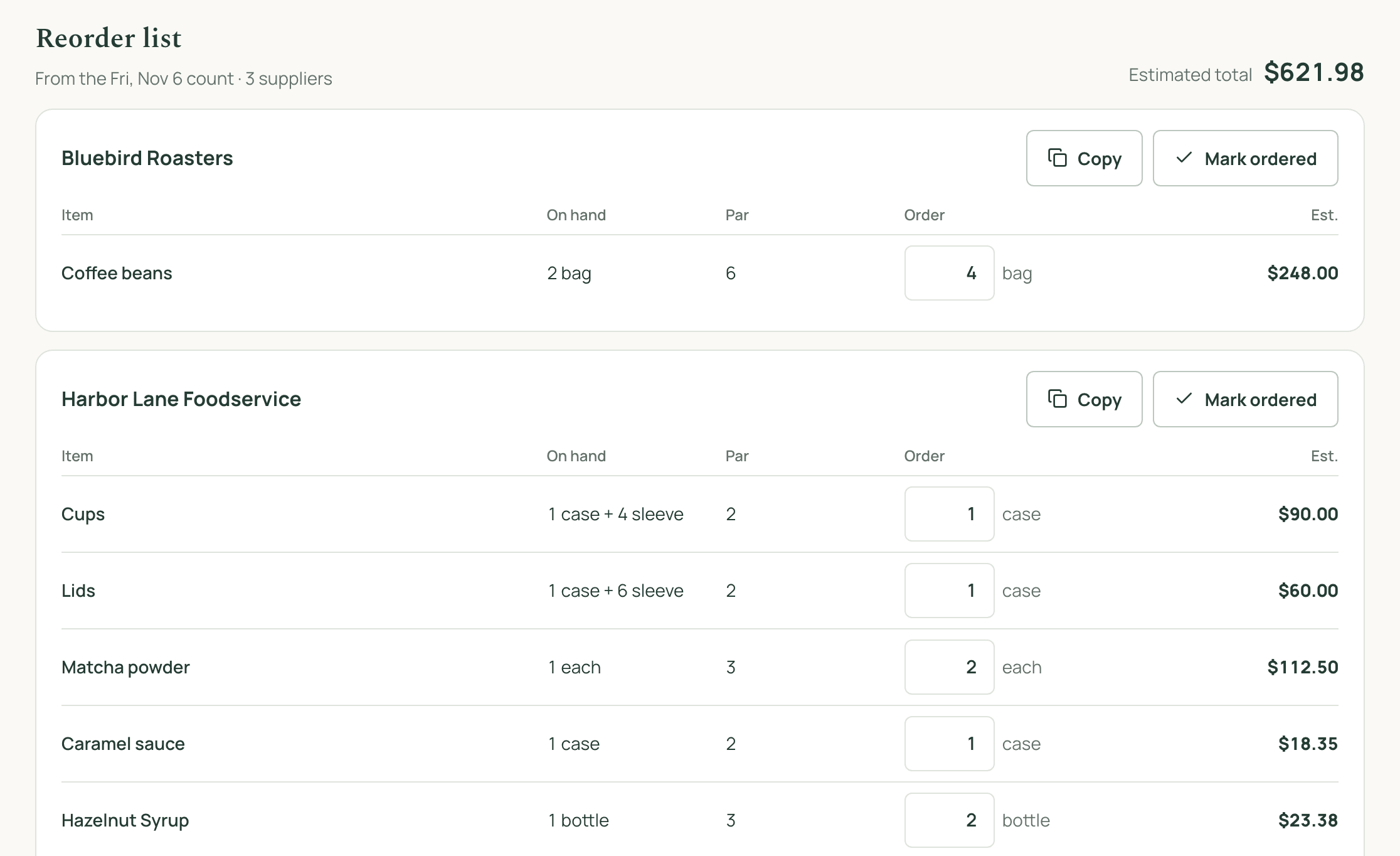
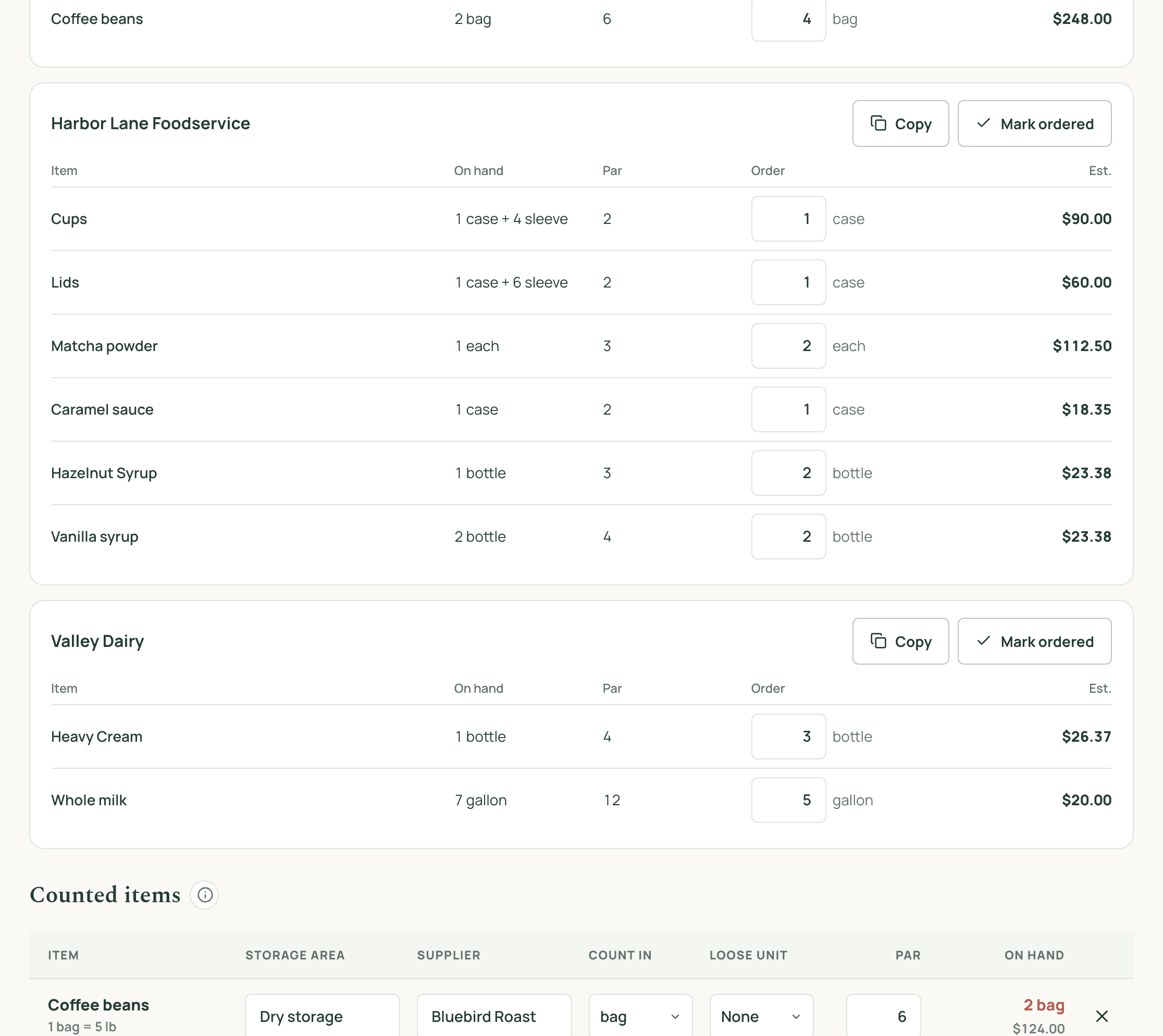
A reorder list for every supplier
Set a par for each item and RecipeMate lists everything below it, grouped by supplier and rounded up to whole cases and bags, with an estimated cost from your latest invoice prices. Adjust any amount, copy the order into a text or email to your rep, and mark it ordered so it drops off the list.
- Pars per item, and per location if you run more than one shop
- Order amounts rounded up to the pack you buy
- Estimated cost per supplier and in total
- One-tap copy of each supplier's order
- On-hand value and below-par count after every count
Count history and usage
See what came in and what got used, week by week
Every count is saved with who did it and what the stock was worth. Open one to see each item's last count, what was received from the invoices you imported in between, this count, and how much was used. A manager can fix a typo after the fact, and the whole history exports to CSV for your accountant.
Cost of goods reports
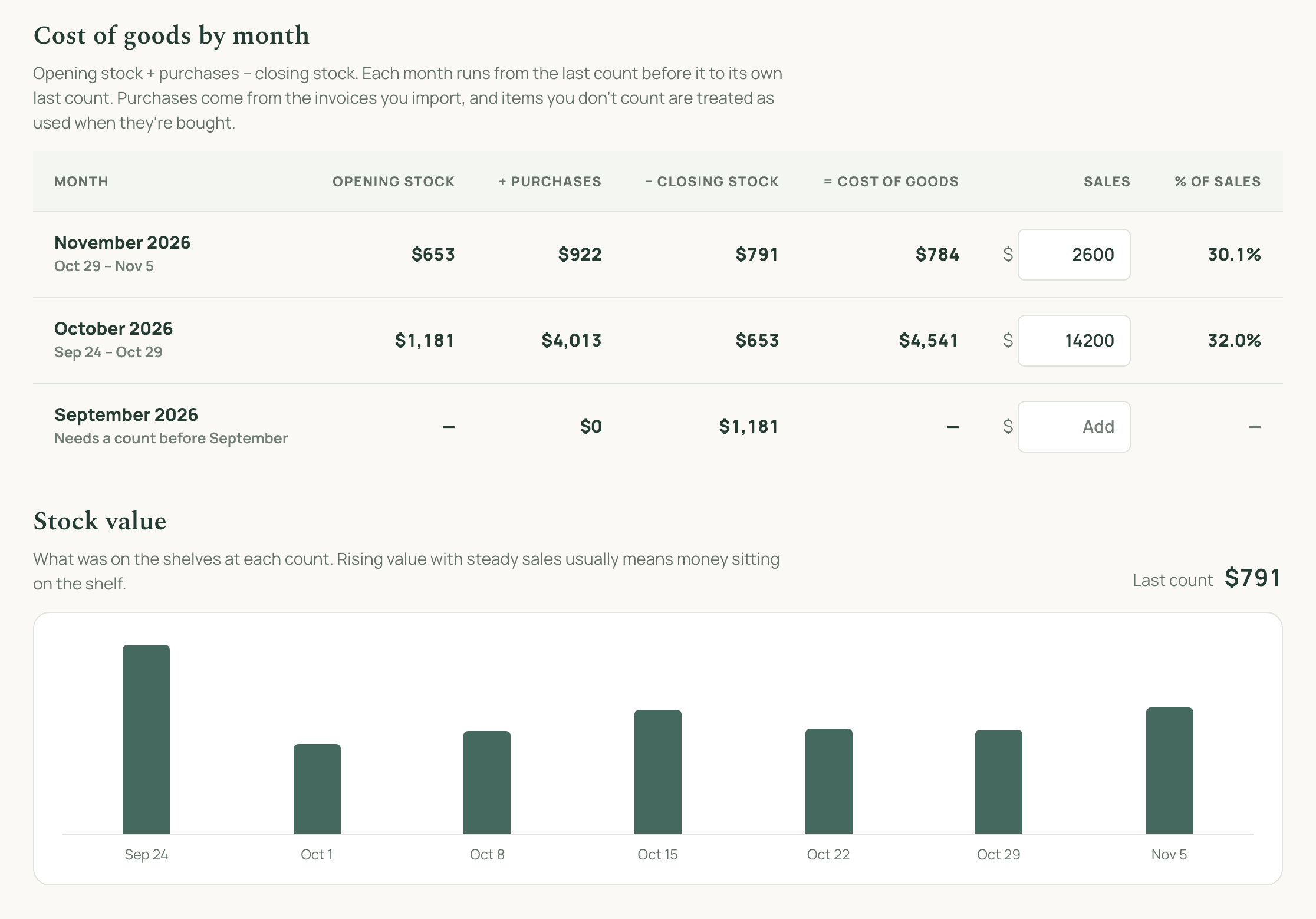
Monthly cost of goods, without the spreadsheet
RecipeMate works out cost of goods for every month: opening stock plus purchases minus closing stock. Stock values come from your counts and purchases from the invoices you import, so there's nothing to add up by hand. Type in the month's sales to see cost of goods as a percentage, and watch stock value count by count to spot money sitting on the shelf.
Usage and suggested pars
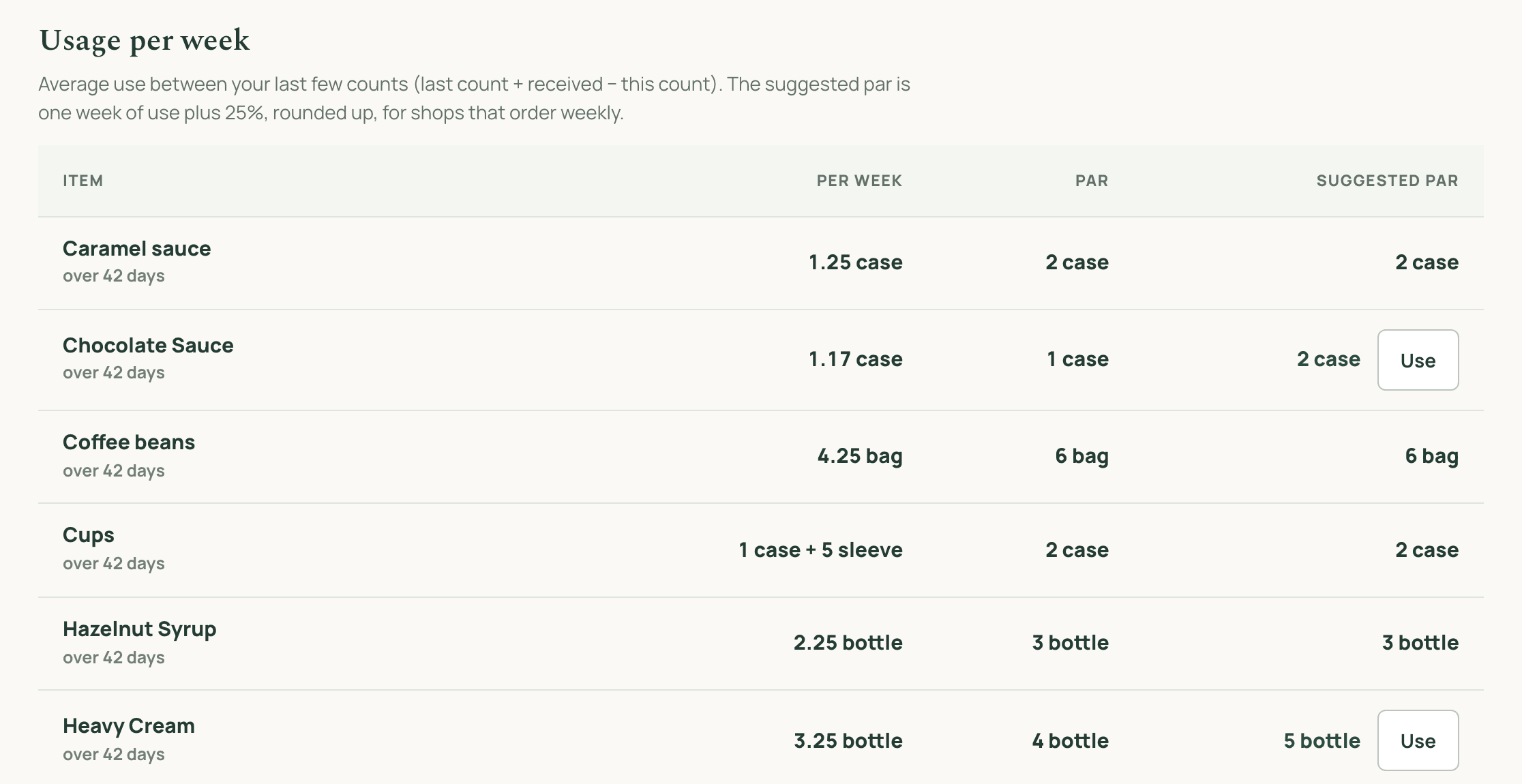
Pars set from what you actually use
See how much of each item you go through per week, averaged over your recent counts. RecipeMate suggests a par of one week's use plus a 25% cushion, and you can apply it with one tap. Pars stop being guesses, and you stop running out of milk on a Saturday.
A weekly routine
Set it up once. It runs every week.
Inventory works best as a habit. RecipeMate ties the count to the checklists your team already uses.
- 1Pick the items worth counting: coffee, milk, syrups, cups. Set where each one lives and who supplies it.
- 2Give each item a par: how many cases, bags, or bottles you want on hand.
- 3Add “Weekly count” to a closing checklist. Staff tap Start count, count shelf by shelf, and the task checks itself off.
- 4Open the reorder list, copy each supplier's order into a text or email, and mark it ordered.
- 5At month end, do one full count and check the reports for cost of goods and which pars to change.
Inventory questions
What is a restaurant inventory app?
It replaces the clipboard count sheet. Staff count stock on a phone or tablet, the app works out what it's worth and what's below par, and you get a reorder list for each supplier. RecipeMate also keeps every count, so you can see what came in and what got used between them.
What is a par level, and how do I set one?
A par is the amount you want on the shelf after a delivery: for example 6 bags of coffee beans or 12 gallons of milk. Set it to roughly one delivery cycle of use plus a small cushion. RecipeMate's usage report shows how much of each item you use per week and suggests a par from it, so you can set pars from real numbers instead of a guess.
How often should a coffee shop or restaurant count inventory?
Most shops count fast-moving and expensive items (coffee, milk, proteins, cups) once a week, the day before they order, and do one full count at the end of the month for cost of goods. In RecipeMate you can make the count a task on a shift checklist so it happens on schedule.
How do I see how much of each item we used?
Open any count in the count history. For every item it shows the last count, what was received from invoices you imported in between, this count, and the amount used (last count + received − this count). If there's more on the shelf than that adds up to, the item is flagged so you can check for a missing invoice or a miscount.
How do I calculate cost of goods sold for a coffee shop or restaurant?
Cost of goods sold is your opening inventory value, plus what you bought during the period, minus your closing inventory value. RecipeMate does this for you every month: the counts give opening and closing value, and the supplier invoices you import give purchases. Add the month's sales and it shows cost of goods as a percentage of sales.
Can my staff see what things cost?
No. Staff see the count sheet: item names, the pack to count in, and the last count. Prices, stock value, and the reorder list are visible to owners and managers only.
Do I need a POS integration?
No. RecipeMate works out usage from your counts and the supplier invoices you import, so it works alongside whatever point of sale you use.
How much does it cost?
Inventory is included in RecipeMate with recipe costing, invoice import, and shift checklists: $30 a month for founding members, locked for as long as you're subscribed. There's a 30-day money-back guarantee.
Founding member offer
One plan. Everything in it.
The first 100 shops lock in the founding price for as long as they stay subscribed. If it isn't paying for itself in 30 days, we'll refund you.
locked in
- Invoice and recipe import
- Unit conversions and sub-recipes
- Margin targets and price-change alerts
- Shift checklists, prep calculator, recipe book
- Staff accounts with no access to financials
Limited to the first 100 shops · 30-day money-back guarantee